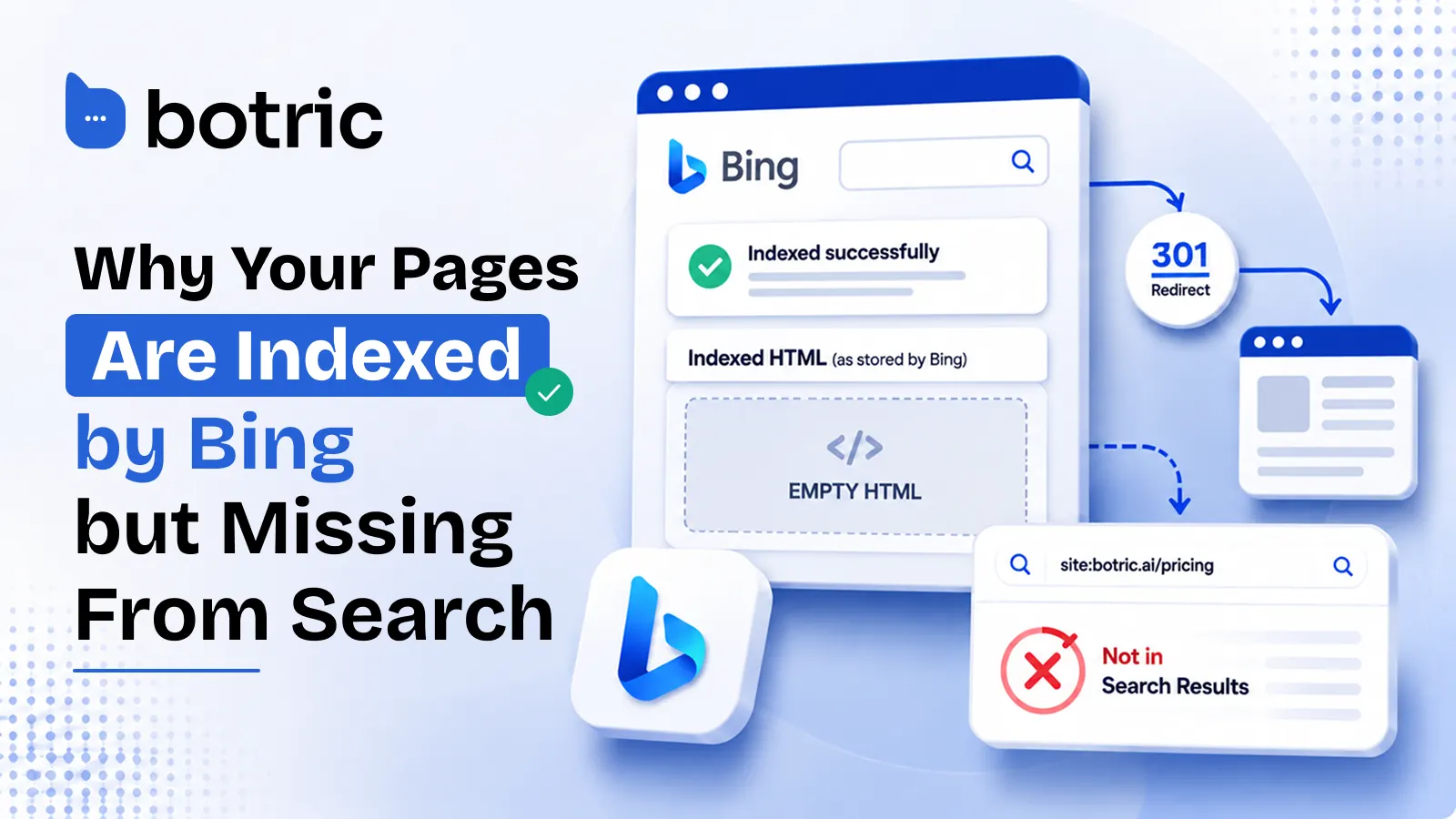
We spent an evening chasing a Bing indexing problem across every possible cause: sitemaps, canonicals, robots.txt, rendering, domain verification.
Every test came back clean. Bing's own URL Inspection tool reported "Indexed successfully." But not a single inner page appeared in search results, not even for exact-match phrase queries.
The root cause turned out to be something nobody talks about: Bing was storing empty HTML documents. The pages were technically "indexed," but there was nothing in them.
This post walks through the full investigation, every hypothesis we tested and eliminated, and the architectural flaw we found at the bottom.
If Bing Webmaster Tools says a page is "Indexed successfully" but the page does not appear for exact-match searches, inspect the Bing Index → Indexed page → HTML view in URL Inspection. If the indexed HTML is empty, Bing may have stored the URL without successfully storing its page content.
In our case, the investigation pointed to the site's 301 redirect architecture as the likely cause. However, we could not confirm whether Bing broadly handles 301 redirects this way, so this should be treated as a case-specific finding rather than a confirmed Bing-wide issue.
The Setup
Our site runs on Next.js deployed to Vercel. The domain structure is straightforward:
botric.ai(non-www) returns a 301 permanent redirect towww.botric.aiwww.botric.aiserves all content- Every page has a self-referencing canonical pointing to the www version
- All sitemaps list www URLs
This is a standard, well-documented configuration. Google handles it without issue.
In Bing Webmaster Tools, the verified property is botric.ai (non-www). Bing does not allow adding www.botric.ai as a separate property because it considers them the same site.
The symptom: the homepage appeared in Bing search results. No other page did. Not /pricing, not /blog, not /compare, not /case-studies. A site:botric.ai query returned only the homepage.
11 Things We Checked Before Finding the Problem
1. Sitemaps
All sitemaps were submitted, parsed, and reported as "Success" in Bing Webmaster Tools. The sitemap index correctly referenced all child sitemaps.
We verified the raw XML with curl to rule out browser extension injection. Clean.
2. Robots.txt
No blocking rules. Verified via curl on both the www and non-www hosts.
3. Server-Side Rendering
Every page returns fully rendered HTML from the server. No content hidden behind JavaScript hydration. Verified by fetching raw HTML with curl.
4. Canonical Tags
Every page carries a self-referencing canonical pointing to its www URL. No cross-page canonicals, no conflicts.
5. Redirects
The 301 from non-www to www is clean, single-hop, and path-preserving:
$ curl -sI https://botric.ai/pricing | head -5

HTTP/2 301
location: https://www.botric.ai/pricing
No chain redirects, no path-stripping.
6. Noindex and Meta Robots
No noindex tags on any page. Bing's own URL Inspection reported "No SEO/GEO issues found."
7. Internal Links
The homepage links to all key sections via plain <a href> tags in the server-rendered HTML. No orphaned pages.
8. IndexNow
Already configured and submitted nine days prior. URLs accepted. No effect on indexing.
9. URL Submission
Multiple pages submitted manually through the URL Submission tool. No effect.
10. Alternate Domains
The alternate domain (botric.xyz) was confirmed blank with no content served.
11. Domain Property Consolidation
We attempted to add www.botric.ai as a separate property. Bing returned "Site already added," confirming it treats both hosts as one property. This ruled out a split-property theory.
Why Bing's "Indexed Successfully" Message Was Misleading
URL Inspection in Bing Webmaster Tools consistently reported:
✅ Indexed successfully. URL can appear on Bing. No SEO/GEO issues found.
This is what made the investigation difficult. Bing's own diagnostic tool said everything was fine. Based on this, we initially concluded there was no indexing problem at all, and that site: queries were simply unreliable (which they are, but that wasn't the full story).
To test further, we ran exact-match phrase searches on Bing using strings that exist only on specific pages. For example, searching a phrase unique to /pricing:
"Balanced plan for brands turning AI discovery into qualified conversations"
Zero results. Multiple phrases tested across multiple pages. None returned the corresponding page. A page that is genuinely indexed and servable must appear for an exact-match phrase query. These didn't.
The Breakthrough: Bing Had an Empty Indexed Page
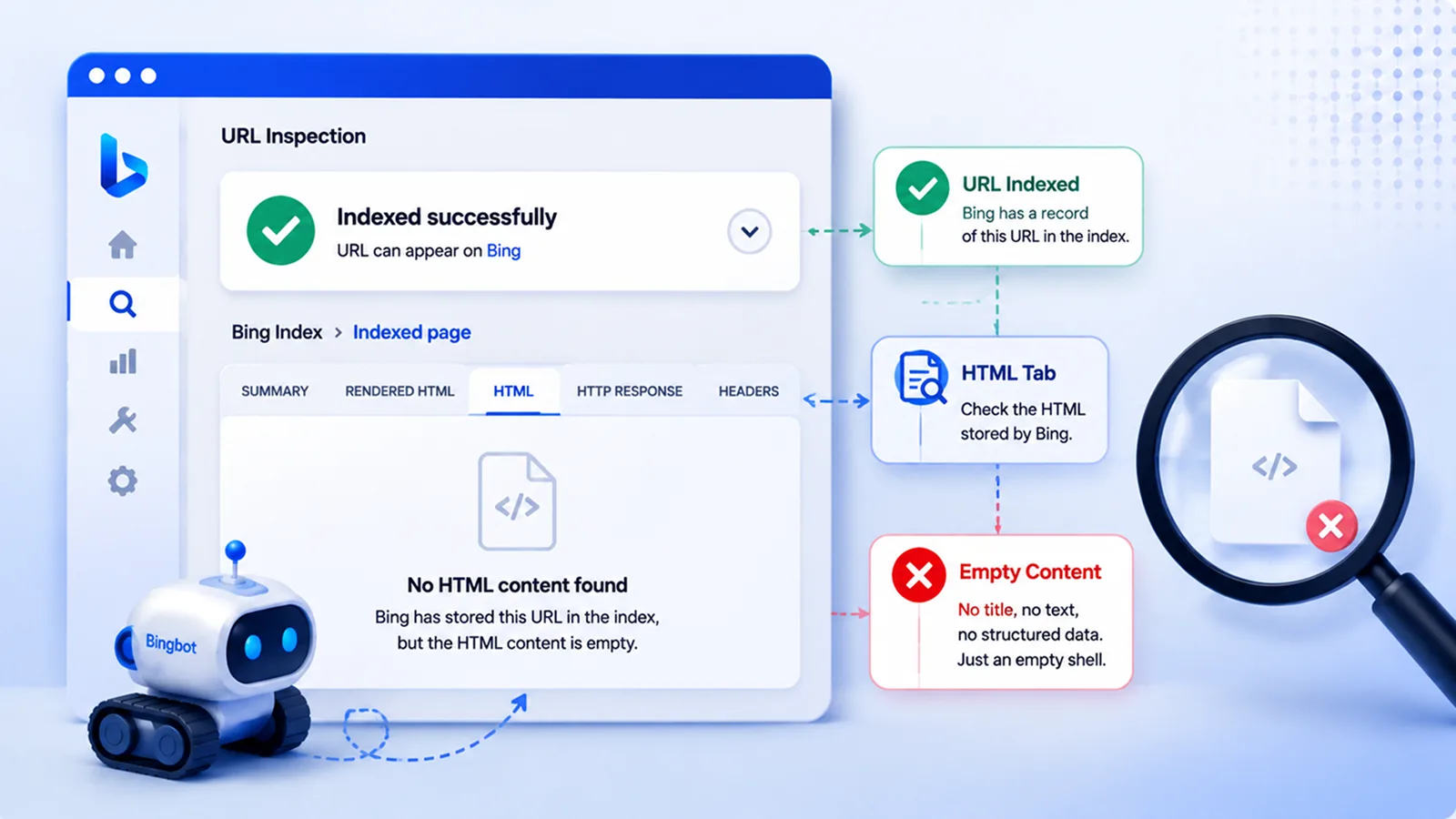
The answer was hiding one click deeper in URL Inspection.
After clicking the expand arrow on "Indexed successfully" and opening the HTML tab under "Bing Index - Indexed page," the panel was completely empty.
No HTML whatsoever. Bing had stored the URL in its index with a blank document body.
The page was "indexed" in the sense that Bing had a record of the URL. But there was no content associated with it. No title, no body text, no structured data. An empty shell.
This explained every symptom:
- URL Inspection reports the URL exists in the index: true, the record exists
- "URL can appear on Bing": technically true, but with no content to match against
- Phrase searches return nothing: correct, there's no text to match
site:returns only the homepage: correct, the homepage is the only page with actual content in the index
The Root Cause: 301 Redirects and Bing's Crawl Pipeline
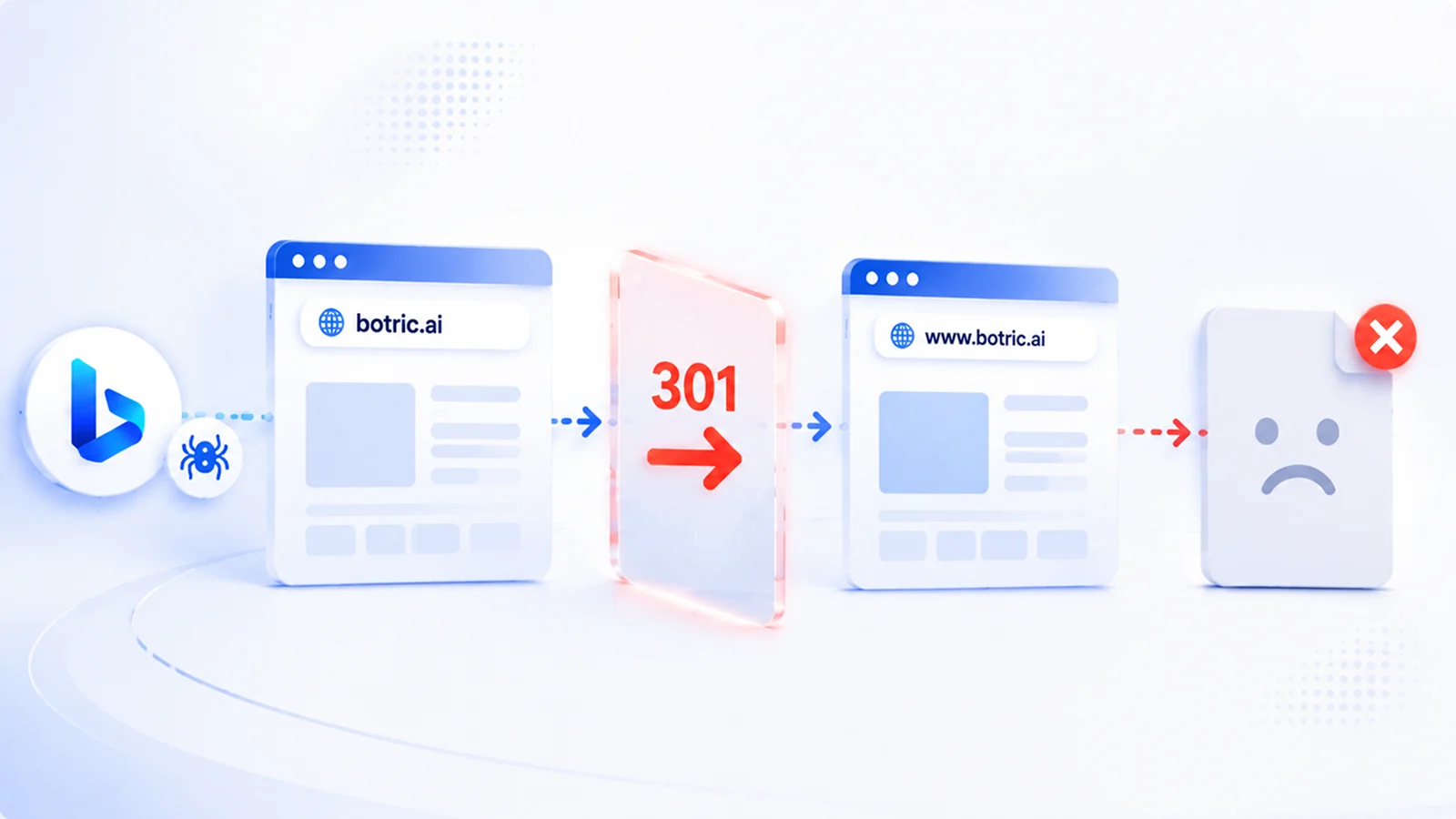
The architecture of the problem:
- Bing's verified property is
botric.ai(non-www) - When Bing crawls URLs under this property, it fetches from the non-www host
- The non-www host returns a 301 redirect with an empty body (as all HTTP redirects do)
- Bing records the response, including the empty body, as the indexed version of the page
- Bing does not follow through to the www destination to fetch the actual content
The homepage escaped this because it has external backlinks pointing directly to www.botric.ai. Bing discovered and crawled the www version independently, bypassing the redirect entirely.
Inner pages have no external links to the www version, so their only crawl path went through the non-www redirect, which produced empty documents.
Why This Matters Beyond Bing Search
This is not just a Bing organic search problem. ChatGPT's web retrieval system runs on Bing's index. Pages stored as empty documents in Bing's index are pages that ChatGPT structurally cannot retrieve, cite, or reference in its responses.
For any brand investing in AI visibility and GEO (Generative Engine Optimization), an empty Bing index for inner pages means those pages are invisible to one of the largest AI platforms.
This is also why we built Botric's AI visibility tracking around more than just citation counts. If an important page isn't being discovered or retrieved, it can affect what AI systems know about a brand in the first place.
Botric helps monitor how your brand and content are being surfaced across major AI platforms, giving you another signal to watch when technical issues affect your AI visibility.
Supporting Evidence: The 307 Comparison
A comparable site using an identical architecture (non-www redirecting to www on Vercel) was confirmed to be fully indexed on Bing. The key difference: that site uses a 307 temporary redirect instead of a 301 permanent redirect.
$ curl -sI https://comparable-site.com/ | head -5

HTTP/2 307
location: https://www.comparable-site.com/
This suggests Bing's crawler may handle 301 and 307 differently when deciding whether to follow through to the destination URL and fetch its content. With a 301, Bing may treat the redirect response itself as the final document. With a 307, Bing may follow through and fetch the destination.
This is unconfirmed behavior and may not be the only variable. The comparable site may differ in domain authority, crawl history, or other factors.
How to Fix Bing Pages That Are Indexed but Not Showing
Option 1. Switch to Non-WWW as Primary Host (Recommended)
Reverse the redirect direction. Make botric.ai the primary host serving content, and have www.botric.ai redirect to it. This aligns the site with the property Bing uses, eliminating the redirect from the crawl path entirely.
In Vercel, this is a domain settings change. Update canonical tags, sitemaps, and structured data to reference the non-www host. Google consolidates within a few weeks and treats 301s between your own hosts as a standard migration.
Option 2. Change Redirect Status Code to 308
A 308 Permanent Redirect is semantically identical to a 301 for ranking purposes (Google treats them the same), but it's a different HTTP status code that Bing's crawler may handle differently. This is the least disruptive change and worth testing before a full migration.
{
  "redirects": [
    {
      "source": "/:path*",
      "has": [{ "type": "host", "value": "botric.ai" }],
      "destination": "https://www.botric.ai/:path*",
      "statusCode": 308
    }
  ]
}
Option 3. Contact Bing Webmaster Support
With the empty HTML screenshot as evidence, this becomes an actionable bug report rather than a vague complaint.
The contradiction between "Indexed successfully" and an empty HTML body is something Bing's engineering team can investigate.
How to Diagnose This Bing Indexing Problem
If you suspect you have the same problem, here's the sequence:
- Check
site:yourdomain.comon Bing. If only the homepage returns, don't stop here.site:is unreliable on Bing. - Run URL Inspection in Bing Webmaster Tools. If it says "Indexed successfully," don't stop here either.
- Search a unique phrase from an inner page on Bing, in quotes. If the page doesn't return, something is wrong despite what URL Inspection says.
- Open the HTML tab in URL Inspection under "Bing Index - Indexed page." If it's empty, Bing has stored an empty document.
- Check your redirect setup. If your Bing property is on a host that only serves redirects, and the redirects are 301s, you may have this exact issue.
- Compare the HTTP Response tab. It will likely show a 301 status code, confirming Bing stored the redirect response rather than following it.
The one-minute version: open URL Inspection → expand "Indexed successfully" → Bing Index → Indexed page → HTML. Empty panel means Bing has a URL record with no content behind it, and no amount of resubmitting sitemaps will fix that. Look at your redirect architecture next.
What This Bing Indexing Issue Taught Us
The biggest lesson from this investigation is that "Indexed successfully" does not necessarily mean Bing has indexed your page content correctly. In our case, Bing had a record of the URLs, but the indexed HTML was empty. That explained why URL Inspection showed a green checkmark while the pages remained absent from search results.
The investigation also exposed a potential weakness in standard www and non-www redirect setups. Bing treated both hosts as the same property, but our evidence suggested that the 301 redirect may have prevented Bing from properly fetching and storing the content on the destination host.
We could not confirm exactly how Bing processed the redirect internally, so the 301 should be treated as the leading cause rather than a confirmed Bing-wide behavior.
The practical solution is to remove the redirect from Bing's crawl path where possible, or test an alternative redirect configuration and verify what Bing stores afterward.
Most importantly, don't stop at the green checkmark.
Technical SEO and AI visibility are increasingly connected. Tools like Botric can help you monitor the other side of that equation by tracking whether your brand and content are actually appearing in AI-generated answers.
Want to go deeper? Read our guide on why your website isn't appearing in AI search, see how we rebuilt this site on Next.js, or compare the best GEO tools for 2026.
Key Takeaways
- "Indexed successfully" in Bing Webmaster Tools only confirms a URL record exists, not that Bing stored the page content.
- Test with exact-match phrase queries in quotes. A genuinely indexed page must return for text unique to it.
- The HTML tab under Bing Index → Indexed page is the diagnostic that matters. An empty panel means an empty stored document.
- If your verified Bing property sits on a host that only serves redirects, the redirect response itself may be what Bing stores.
- ChatGPT's web retrieval runs on Bing's index, so empty Bing documents are a direct AI visibility problem, not just an organic search one.
Frequently Asked Questions
Why does Bing say my page is indexed when it doesn't appear in search?
Bing's "Indexed successfully" status confirms that Bing has a record of the URL, but it does not necessarily mean the page's content was stored correctly. Check Bing Index → Indexed page → HTML in URL Inspection. If the HTML is empty, Bing may have indexed the URL without its page content.
How can I check what HTML Bing has indexed?
Open the affected URL in Bing Webmaster Tools → URL Inspection. Expand the "Indexed successfully" result and open the HTML tab under "Bing Index - Indexed page." This lets you inspect the content Bing has stored for the URL.
Can a 301 redirect prevent Bing from indexing a page correctly?
A 301 redirect should normally pass users and search engines to the destination URL. However, in our case, the evidence pointed to the 301 redirect between the non-www and www versions as a possible cause of Bing storing empty HTML. We could not confirm whether this is a broader Bing behavior.
Should I switch from www to non-www to fix Bing indexing?
Not necessarily. Switching the primary host may remove the redirect from Bing's crawl path, but it also changes your site's canonical setup. If you suspect a similar issue, inspect Bing's indexed HTML first and consider testing the redirect configuration before making a site-wide host change.
Does changing a 301 redirect to a 308 fix Bing indexing issues?
It may be worth testing, but there is no confirmed evidence that changing a 301 to a 308 universally fixes this problem. If you test a 308, recheck the affected URLs in Bing Webmaster Tools and inspect the indexed HTML afterward.
Can Bing indexing problems affect AI visibility?
Potentially. Search indexes can influence how AI-powered search and retrieval systems discover web content. If important pages are missing or incorrectly represented in Bing's index, they may have fewer opportunities to be retrieved or cited by AI systems. Monitoring AI visibility alongside technical SEO can help identify these issues.