When we launched Botric, our marketing site was built on WordPress. It was the obvious choice, quick setup, thousands of plugins, and a familiar admin panel. But as our AI-powered growth platform matured, the gap between what our product represented and what our website delivered became impossible to ignore.
Performance started becoming a real problem. Page load times were inconsistent, Core Web Vitals kept dropping, and even small updates felt risky. For a company that helps businesses grow with AI, a sluggish WordPress site sent the wrong message.
So we rebuilt everything.
We migrated Botric, with over 14 pages and 16 blog posts, from WordPress to a statically exported Next.js 14 application deployed on Vercel. The result is a faster, more secure, and developer-friendly site that is optimized for discovery by AI search engines like ChatGPT, Claude, and Perplexity.
This post walks through the entire migration, including why we did it, what we chose, how we executed it, and what we learned along the way.
WordPress vs Next.js: Side by Side
Before diving into how we migrated, here is an honest comparison of what changed across the areas that mattered most to us:
| Category | WordPress | Next.js + Vercel |
|---|---|---|
| Cost | PHP/MySQL hosting + managed DB + premium plugins add up quickly | Runs on the company's Vercel account with no plugin licensing costs |
| Developer Experience | Separate PHP/theme system; hard to align with product codebase | Same TypeScript + React stack as the product; full component reuse |
| Content Workflow | WordPress admin panel; plugin-dependent; revision history in database | MDX files in Git; branch-based drafts; full diff history; Claude Code for non-devs |
| SEO | Yoast and similar plugins; manual meta management; limited control | Native Metadata API; dynamic OG tags; full control over robots.txt and sitemap |
| Security | Constant plugin patching; PHP/MySQL attack surface; most-attacked CMS on the internet | No server runtime, no database, no plugins. Drastically smaller attack surface |
| AI Crawler Support (GEO) | Usually blocked or ignored by default | Explicitly allows GPTBot, Claude-Web, PerplexityBot in robots.txt |
| Scalability | Requires DB tuning, PHP workers, load balancers at scale | Static CDN scales automatically. No config changes needed |
| Vendor Lock-in | Tied to WordPress ecosystem, themes, plugins | Just files in a Git repo, portable, auditable, yours |
The Tech Stack: What We Chose and Why
Every technology decision was driven by a single principle: ship static HTML from a global CDN, with zero server compute in production. This is the same approach used by many high-performance Next.js marketing websites.
Here is a breakdown of what we chose and why:
| Technology | Why We Chose It |
|---|---|
| Next.js 14 (App Router) | File-based routing, React Server Components, and native static export via output: 'export' |
| React 18 + TypeScript | Component architecture with type safety across the entire codebase |
| Tailwind CSS + Shadcn/UI | Utility-first CSS paired with accessible, Radix-based UI primitives |
| Framer Motion | Smooth page transitions and micro-interactions without heavyweight animation libraries |
| MDX (next-mdx-remote + gray-matter) | Blog posts as version-controlled markdown files with embedded JSX components |
| Vercel | Zero-config deployment, global edge CDN, built-in security headers, instant rollbacks |
The critical line in our next.config.mjs is just three properties:
const nextConfig = {
  output: "export",
  images: { unoptimized: true },
  pageExtensions: ["js", "jsx", "ts", "tsx", "md", "mdx"],
};
With output: "export", Next.js pre-renders every page as static HTML at build time. There is no Node.js server running in production. Just HTML, CSS, and JavaScript served from Vercel's edge network to the nearest user.
This single architectural decision removed entire categories of problems we used to face on WordPress, including server downtime, database connection limits, PHP memory issues, and the constant security patching that comes with a dynamic CMS.
The Migration Process
Step 1. The Migration Script
To handle the bulk of the migration, we wrote a custom Node.js script (scripts/wp-to-markdown.js, 314 lines) that automated most of the work.
Here's how the workflow looked:
- Export from WordPress → We started by downloading the standard WordPress XML export from the admin panel (Tools → Export → All Content).
- Parse the XML → Using
fast-xml-parser, the script processes each published post and extracts key data like title, slug, publish date, author, categories, tags, excerpt, and the full HTML content. - Convert HTML to Markdown → A custom
htmlToMarkdown()function handles headings, bold/italic, links, images, lists, blockquotes, code blocks, figures, and HTML entity decoding. WordPress shortcodes are stripped automatically. - Download and localize images → Every image URL found in the content is downloaded to
/public/blog-images/and the markdown is rewritten to use local paths. No more external image dependencies. - Generate MDX files with frontmatter → Each post is converted into an
.mdxfile with structured YAML frontmatter, including all relevant metadata. - Create redirect mappings → Old WordPress URLs are mapped to new
/blog/[slug]paths and saved toredirects.jsonfor preserving link equity.
Here is a simplified look at how the HTML-to-Markdown conversion handles key elements:
// Headings
md = md.replace(/<h2[^>]*>(.*?)<\/h2>/gi, "## $1\n\n");
// Bold
md = md.replace(/<strong[^>]*>(.*?)<\/strong>/gi, "**$1**");
// Links
md = md.replace(/<a[^>]*href="([^"]*)"[^>]*>(.*?)<\/a>/gi, "[$2]($1)");
// Images
md = md.replace(/<img[^>]*src="([^"]*)"[^>]*alt="([^"]*)"[^>]*\/?>/gi, "");
// Blockquotes
md = md.replace(/<blockquote[^>]*>(.*?)<\/blockquote>/gis, (_, content) => {
return content.split("\n").map((line) => `> ${line.trim()}`).join("\n");
});
Running the script against our WordPress export took about 30 seconds and produced 16 clean .mdx files with all images localized.
Step 2. Content Directory Structure
After migration, our blog content lives in a flat directory structure:
content/posts/
├── ai-citation-tracking-b2b-saas.mdx
├── ai-search-visibility-brand-vs-competitor.mdx
├── ai-visibility-audit-checklist.mdx
├── automate-brand-responses-ai-chat-agents.mdx
├── best-geo-tools.mdx
├── best-tools-to-rank-in-chatgpt.mdx
├── best-writesonic-alternatives.mdx
├── generative-engine-optimization-explained.mdx
├── get-your-business-listed-in-chatgpt-and-gemini.mdx
├── how-to-improve-ai-search-visibility-2026.mdx
├── why-brand-not-showing-in-ai-search.mdx
├── why-website-not-showing-in-ai-search.mdx
└── wordpress-to-nextjs-migration-botric.mdx
Each file is self-contained: frontmatter metadata at the top, markdown content below.
How We Approached SEO and GEO in This Migration

1. Page-Level Metadata
Every page uses the Next.js Metadata API to define title, description, keywords, canonical URLs, robots directives, OpenGraph tags, and Twitter Cards. For blog posts, metadata is generated dynamically.
export async function generateMetadata({ params }) {
  const { slug } = await params;
  const post = getPostBySlug(slug);
  if (!post) return {};

  return {
    title: `${post.title} | Botric Blog`,
    description: post.excerpt,
    openGraph: {
      title: post.title,
      description: post.excerpt,
      type: "article",
      publishedTime: post.date,
      ...(post.featuredImage && { images: [post.featuredImage] }),
    },
  };
}
This ensures every blog post includes rich metadata for search engines and social sharing, without needing to manually update meta tags in an admin panel.
2. AI-Optimized robots.txt (GEO Strategy)
This is our unique differentiator. Most WordPress sites either block AI crawlers or simply ignore them. We took the opposite approach. Our robots.txt explicitly allows every major AI crawler:
User-agent: *
Allow: /

Sitemap: https://www.botric.ai/sitemap.xml

User-agent: GPTBot
Allow: /

User-agent: ChatGPT-User
Allow: /

User-agent: Claude-Web
Allow: /

User-agent: PerplexityBot
Allow: /
Why does this matter? As AI search engines like ChatGPT, Claude, and Perplexity become primary discovery channels, your content needs to be crawlable by their bots. This is known as Generative Engine Optimization (GEO), and it is a core part of what Botric does for clients.
By explicitly allowing GPTBot, ChatGPT-User, Claude-Web, and PerplexityBot, we ensure our content is indexed and cited by AI assistants when users ask questions about GEO, AI agents, or SaaS growth. Most WordPress-to-Next.js migration guides do not cover this. It is a forward-looking SEO decision that most teams still overlook.
3. Sitemap
We maintain a static sitemap.xml with priority levels that reflect page importance:
- 1.0, Homepage
- 0.9, Solutions and pricing pages
- 0.8, About, contact, and individual solution pages
- 0.3, Legal pages (privacy, terms)
This gives search engines and AI crawlers a clear signal of which pages matter most.
4. URL Redirect Strategy
The migration script generates a redirects.json file that maps old WordPress URLs to new /blog/[slug] paths using 301 redirects. This preserves link equity and prevents 404 errors.
5. Structured Content for AI Discovery
Beyond technical SEO, how we structure content also matters for GEO. Our blog posts use clear heading hierarchies, FAQ-style sections, direct answers to common questions, and structured comparisons.
AI models tend to favor content that is well organized and directly answers queries, which is exactly what clean Markdown with proper headings supports.
Performance: Before vs After
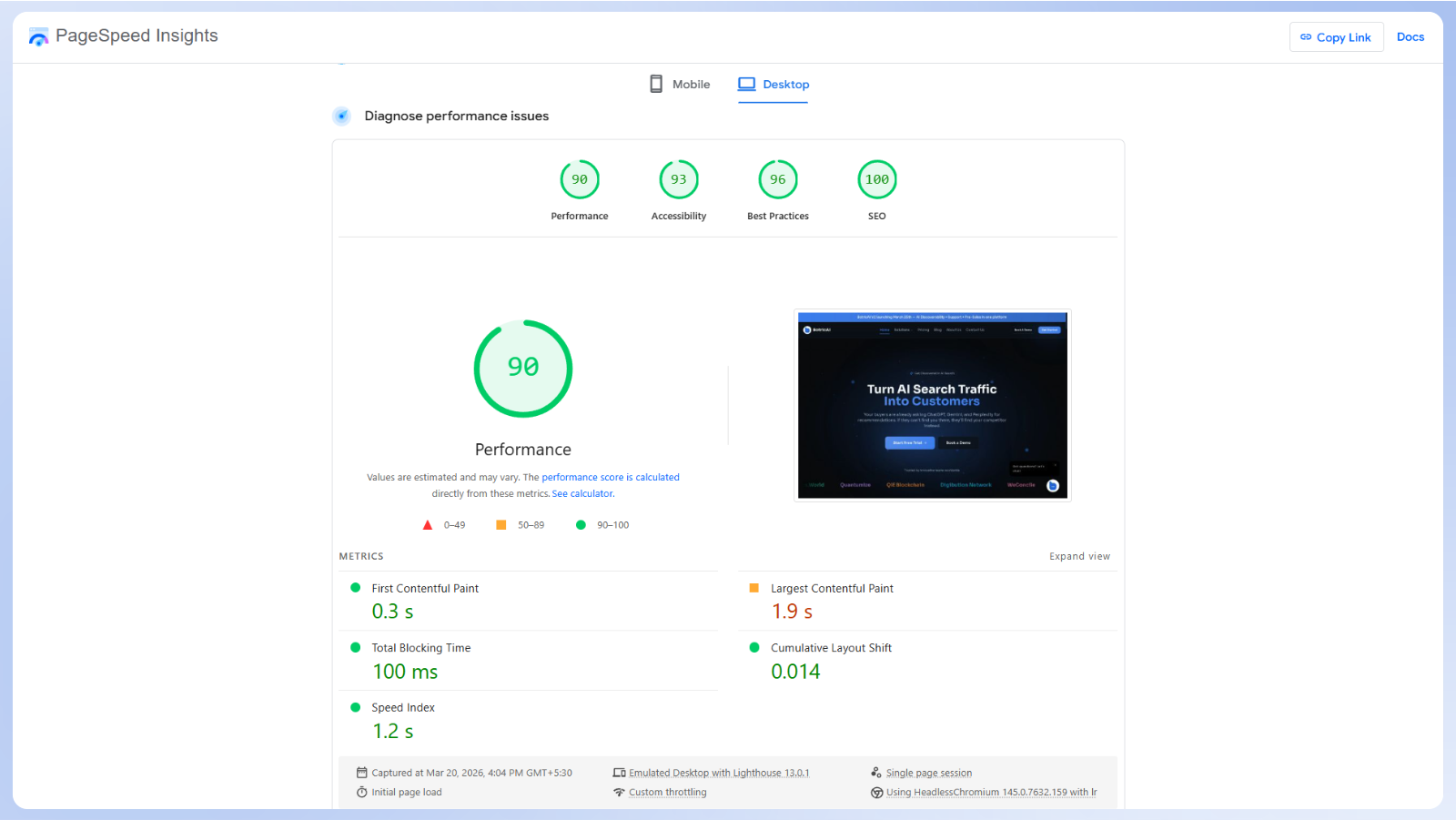
The biggest improvement did not come from small optimizations. It came from removing entire layers of runtime overhead.
1. Static Export = Zero Server Compute
On WordPress, every page request triggered a PHP execution cycle: parse the request, query MySQL, assemble the HTML, send the response. Even with caching plugins, the baseline overhead was significant.
With Next.js static export, every page is pre-built as HTML during npm run build. In production, Vercel's CDN serves these files from the edge location nearest to each user. The result is consistently fast page loads across locations.
2. Font Optimization
On WordPress, fonts were typically loaded from external sources, which often delayed text rendering and sometimes caused flashes of invisible text.
We use the next/font module to self-host the Sora font family:
const sora = Sora({
  subsets: ["latin"],
  variable: "--font-sora",
  display: "swap",
});
The display: "swap" directive ensures text is immediately visible with a fallback font while Sora loads, eliminating the flash of invisible text that plagued our WordPress setup.
We also add preconnect hints for Google Fonts, Google Analytics, and Calendly to reduce DNS lookup times.
3. Lazy Loading
On WordPress, scripts and third-party resources are often loaded upfront, increasing initial load time and blocking rendering.
With Next.js, performance-critical resources are loaded only when needed:
- Google Analytics uses Next.js Script with
strategy="lazyOnload". It does not block the initial paint. - Blog images use native
loading="lazy"attributes. - YouTube embeds use
youtube-nocookie.comfor privacy and are loaded via Intersection Observer through a custom LazyYouTube component. The iframe is not injected until the user scrolls to it.
4. Image Optimization with WebP
On WordPress, image optimization depended on plugins or external services, often leading to inconsistent results and larger payload sizes.
With Next.js, we store all featured images in WebP format, typically reducing file sizes compared to JPEG at similar quality.
Since static export requires images: { unoptimized: true } (Next.js Image Optimization needs a server), we pre-optimize all images before committing them to the repository.
5. Security Headers
On WordPress, security configurations depended on plugins and server setup, which could vary across environments.
With Next.js, security headers are defined once in vercel.json and applied consistently across all routes.
{
  "headers": [
    {
      "source": "/(.*)",
      "headers": [
        { "key": "Strict-Transport-Security", "value": "max-age=31536000; includeSubDomains; preload" },
        { "key": "X-Frame-Options", "value": "DENY" },
        { "key": "X-Content-Type-Options", "value": "nosniff" },
        { "key": "Referrer-Policy", "value": "strict-origin-when-cross-origin" },
        { "key": "Content-Security-Policy", "value": "default-src 'self'; script-src 'self' ..." },
        { "key": "Permissions-Policy", "value": "geolocation=(), microphone=(), camera=()" }
      ]
    }
  ]
}
These headers enforce HTTPS (HSTS with preload), prevent clickjacking (X-Frame-Options: DENY), block MIME-type sniffing, restrict what the page can access (Content-Security-Policy), and disable unnecessary browser APIs (Permissions-Policy). Beyond security, these headers positively influence Lighthouse scores and are a trust signal for search engines.
6. Skeleton Loading States
On WordPress, pages often showed a blank screen before content appeared, especially under slower conditions.
With Next.js, every major page has a custom loading.jsx file that renders skeleton UI with Tailwind's animate-pulse class.
This gives users an instant visual response while the page content hydrates, dramatically improving perceived performance compared to WordPress's blank-screen-then-sudden-render pattern.
Business Benefits of Migrating from WordPress to Next.js
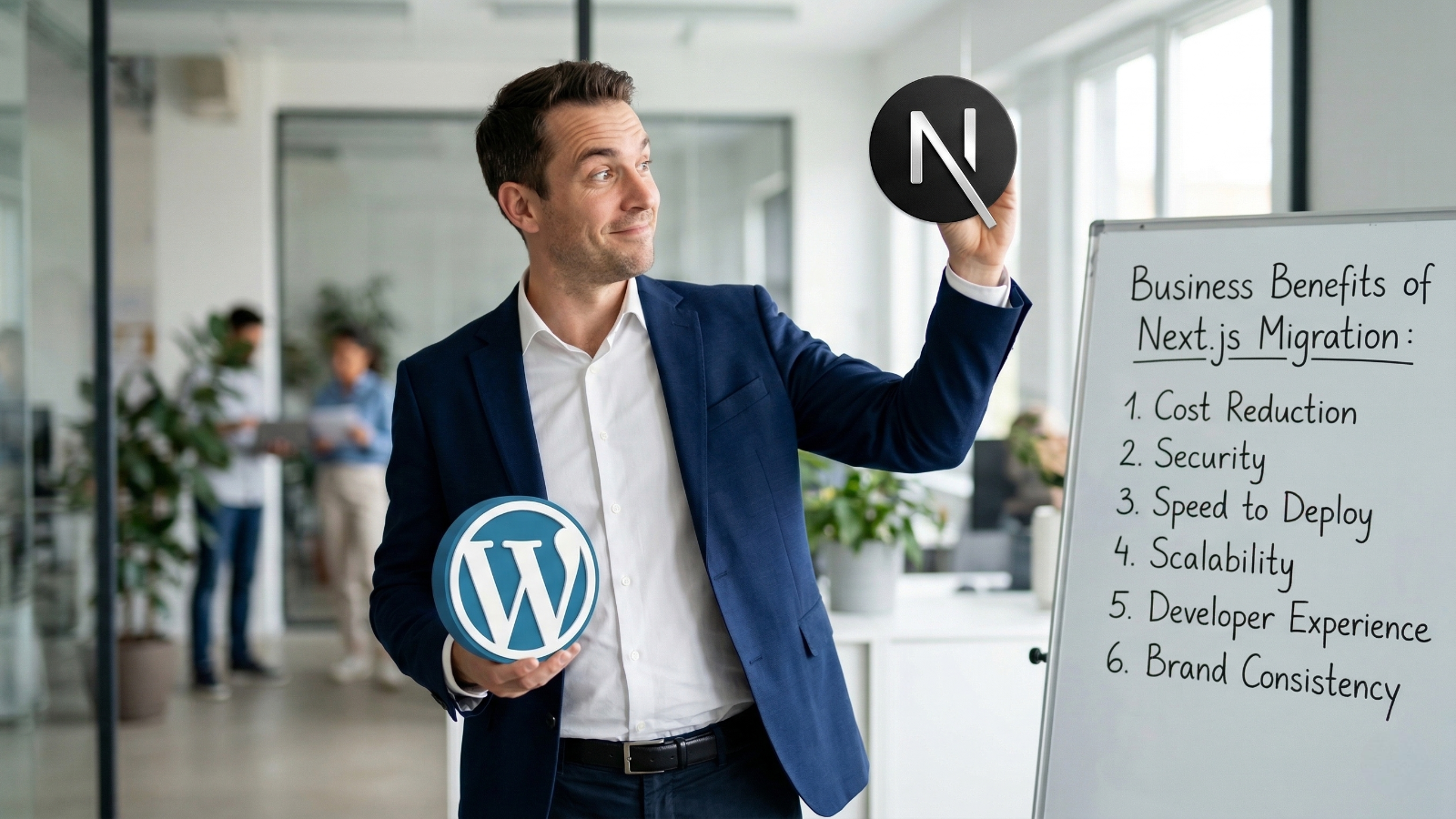
The result is not just better performance, but a system that is easier to maintain, scale, and build on over time:
1. Cost Reduction
We no longer pay for PHP/MySQL hosting, premium plugins, or managed database services. Our site runs on our company's Vercel account, which handles current traffic comfortably at a lower cost than a typical managed WordPress setup.
2. Security
Removing WordPress from our stack reduced a large portion of our attack surface. There is no PHP runtime, no database exposed to queries, and no third-party plugins introducing vulnerabilities. Instead of constantly patching and monitoring, the system is simpler and inherently more secure.
3. Speed to Deploy
Deployments are straightforward. Push to Git, and the site is live within seconds. There is no need for FTP uploads, server access, or manual cache clearing.
4. Scalability
The site runs as static files served through a global CDN, which means it scales automatically with traffic. There is no need to manage database connections, tune backend processes, or configure load balancers.
5. Developer Experience
The entire site is built with the same tools we use for the product, including TypeScript and reusable components. This makes it easier for developers to contribute without switching contexts or learning a separate system.
6. Brand Consistency
We use the same design system across both product and marketing, including the Sora font family, an HSL-based color system, and Tailwind design tokens. This keeps the experience consistent without the overhead of managing themes or dealing with plugin conflicts.
How Claude Code Made This Migration Possible in Days
Most migration guides focus on tools and architecture, but skip a more practical question: who actually does the work, and how long does it take?
A project like this, rebuilding 14+ pages, migrating 16 blog posts, setting up an MDX pipeline, configuring SEO metadata, adding security headers, and deploying to Vercel, would normally take a small team several weeks.
We completed it in a few days. A big part of that came down to using Claude Code, Anthropic's terminal-based AI coding assistant.
AI-Assisted Development at Every Stage
Claude Code was not just used for autocomplete. We used it across multiple parts of the workflow:
- Migration script creation → We outlined the requirements, parsing WordPress XML, converting HTML to Markdown, downloading images, and generating MDX with frontmatter. Claude Code helped generate and refine the script, including handling edge cases like redirects and shortcode removal.
- Component architecture → The blog UI components (BlogHero, BlogCardGrid, AnimatedPostHeader, ReadingProgress, RelatedPosts) were built collaboratively with Claude Code, specifying the behavior we wanted and iterating on the output in real time.
- SEO and security configuration → From metadata handling to configuring headers in vercel.json, Claude Code helped implement patterns aligned with current best practices.
- Debugging and iteration → When static export threw errors or MDX rendering had edge cases, we described the problem in the terminal and Claude Code diagnosed and fixed the issues.
Why We Don't Need a CMS Anymore
This is the bigger story. When we left WordPress, the obvious question was: how will the content team publish without a CMS?
The typical approach is to adopt a headless CMS like Sanity, Contentful, or Strapi. That usually means another tool to manage, another interface to learn, and another recurring cost.
We chose a simpler path. Content now lives directly in the codebase as MDX files, managed through Git. Publishing is straightforward. A new post is created as a file, added to the repository, and deployed automatically.
Formatting is handled through shared MDX components. Images, links, blockquotes, code blocks, and headings follow consistent rules defined once and applied across all posts. There is no plugin layer or per-post configuration.
All content is managed in Git. Every change is tracked, drafts can be handled through branches, and rollbacks are straightforward. This replaces WordPress revisions with a clearer and more reliable workflow.
This keeps the workflow simple while giving us full control over structure, formatting, and how content is rendered. In practice, this acts as a lightweight headless CMS alternative without the overhead of managing another platform.
The Content Team Is Now Self-Sufficient
This was the shift we did not fully anticipate. Our content team, most of whom had never used the terminal before, can now manage the entire blog independently. They do not need a developer to publish a post, fix a typo, update metadata, or make structural changes.
Claude Code bridges the gap between "I know what I want to write" and "the code is committed and deployed."
This matters because it addresses a long-standing limitation of CMS-free setups. While static MDX blogs offer clear benefits in performance, security, and version control, they have traditionally been difficult for non-technical teams to work with. AI coding agents like Claude Code remove that barrier completely.
The result is a content operation that is:
- Faster → No context-switching between a CMS dashboard and the actual website
- Cheaper → No CMS subscription fees, no plugin licenses, no vendor lock-in
- More capable → The content team can do things a CMS never allowed: write custom MDX components, modify page layouts, update site configuration, all through conversation with Claude Code
- Future-proof → As AI coding agents improve, the content team's capabilities grow with them, without switching tools or platforms
This is what we mean when we say we are an AI-powered growth platform. We do not just build AI products for our clients. We use AI to run our own operations. The website you are reading right now was built, is maintained, and is published using AI at every step.
Who Should Consider This Migration
This approach works really well for some teams, but not all. For the right team, this can be a strong WordPress alternative for SaaS, especially when performance and flexibility matter.
Good Fit:
- SaaS companies with in-house React/TypeScript developers.
- Teams that care about GEO optimization and want AI crawlers to index their content.
- Startups wanting zero vendor lock-in (your site is just files in a Git repo).
- Performance-focused teams that need consistently fast page loads across locations.
- Agencies that need reproducible, auditable deployments.
Not Ideal For:
- Sites heavily dependent on WordPress plugins (WooCommerce, membership systems, LMS platforms).
- Teams that require visual drag-and-drop page building, though pairing Next.js with a headless CMS remains an option.
- Organizations with strict compliance requirements around content approval workflows that rely on audit-trail GUIs, though a preview branch workflow with live preview URLs and controlled merges can address this effectively.
Final Thoughts
This migration was not just about improving performance. It was about building a system that aligns with how discovery is changing.
As AI platforms like ChatGPT and Perplexity become primary entry points to the web, content needs to be structured, accessible, and easy for these systems to understand. That is where Generative Engine Optimization (GEO) becomes critical. If you want to know which tools can help, see our guide on the best tools to rank in ChatGPT and AI search engines.
By moving to a simpler, structured, and static setup, we made our content easier to serve, easier to maintain, and easier to surface in AI-driven environments.
At Botric, this is exactly what we focus on, helping businesses improve their content visibility across AI-driven search by strengthening their GEO and building systems designed for modern discovery.
Try Botric for free today to see how your content performs across AI-driven search and where you can improve.
Key Takeaways
- We moved botric.ai from WordPress to Next.js for speed, security, and simpler maintenance.
- Static rendering and a leaner stack fixed the Core Web Vitals problems we had on WordPress.
- SEO and GEO were planned into the migration rather than added afterward.
- Redirects, metadata, and structured data all need verifying before launch.
- Claude Code compressed what would have been a multi-week migration into days.
Frequently Asked Questions
Will we lose SEO rankings during the migration?
Not if redirects are handled correctly. We generate a redirects.json file that maps every old WordPress URL to its new path using permanent (301) redirects. This preserves link equity, prevents broken links, and signals to search engines that the content has moved. In our case, we did not see any meaningful drop in rankings.
What if our content team cannot work with Git?
This was our biggest concern, but it turned out to be a non-issue. Our content team now manages the blog independently, publishing posts and making updates without developer help. Claude Code bridges the gap by turning instructions into code changes, with a learning curve shorter than a typical CMS.
Why not use a headless CMS like Sanity or Contentful?
You can, and for many teams it is the right choice. A headless CMS makes sense if you need a visual editor, role-based workflows, or complex content modeling. For us, it would have added another system to manage along with additional cost. Since our workflow is file-based and version-controlled, we chose to keep things simpler.
Does Next.js static export support dynamic features?
Static export works best when content is known at build time. If your site depends on user authentication, real-time data, or server-side personalization, you will need a server-backed setup or external APIs. Our Next.js marketing website is purely informational, which makes static export a good fit.
How long does the migration take?
In our case, it took a few days. Without automation, a more typical timeline for a small team would be a couple of weeks, including rebuilding pages, handling SEO, testing, and deployment setup. The content migration itself can be automated and completed quickly once the script is in place.